
Feature · Brush Presets
Brush Presets with Stroke Previews
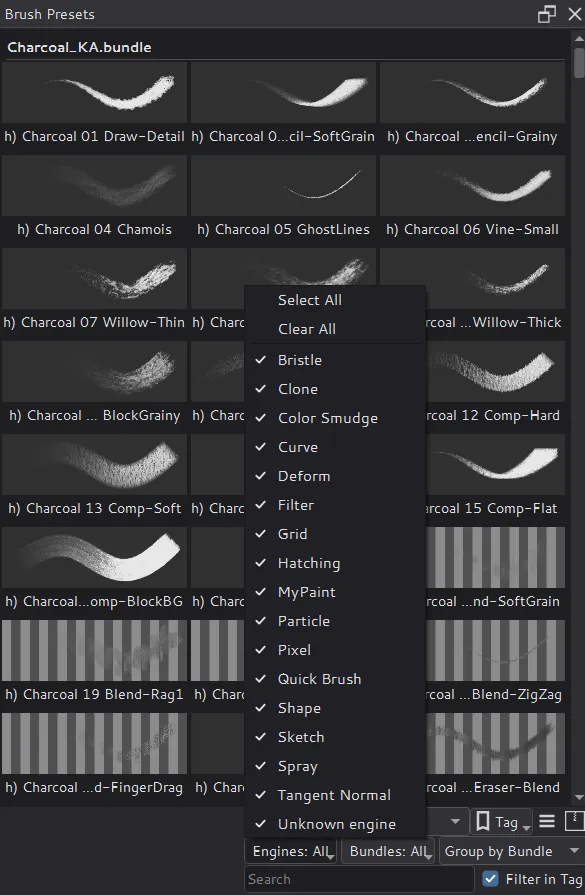
In Solstice, every brush preset shows as a stroke preview. Filter the presets by engine and bundle, and group them by engine or bundle.
What changes from Krita
- Stroke previews: each preset is a short stroke painted with that brush, with its name underneath, instead of the preset's icon. The grid adapts its columns to the docker's width.
- Engine and bundle filters: check several engines or bundles at once, together with tags and search. Photoshop brush libraries count as bundles.
- Grouping: show the presets under a header per engine or per bundle.
- Everywhere: the toolbar brush popup, the Brush Editor's preset list and Quick Access show the same previews.
- A steady list: switching brushes highlights the new preset without scrolling the list. Scroll to Selected Preset in the display menu restores Krita's behavior.
How previews are made
Previews are painted in the background from the saved presets, cached on disk and reused after a restart. Painting on the canvas always comes first: preview work pauses while a document is busy. The previews use the CPU and do not need the GPU engine.