
Feature · Tool Options
Brush Settings in Tool Options
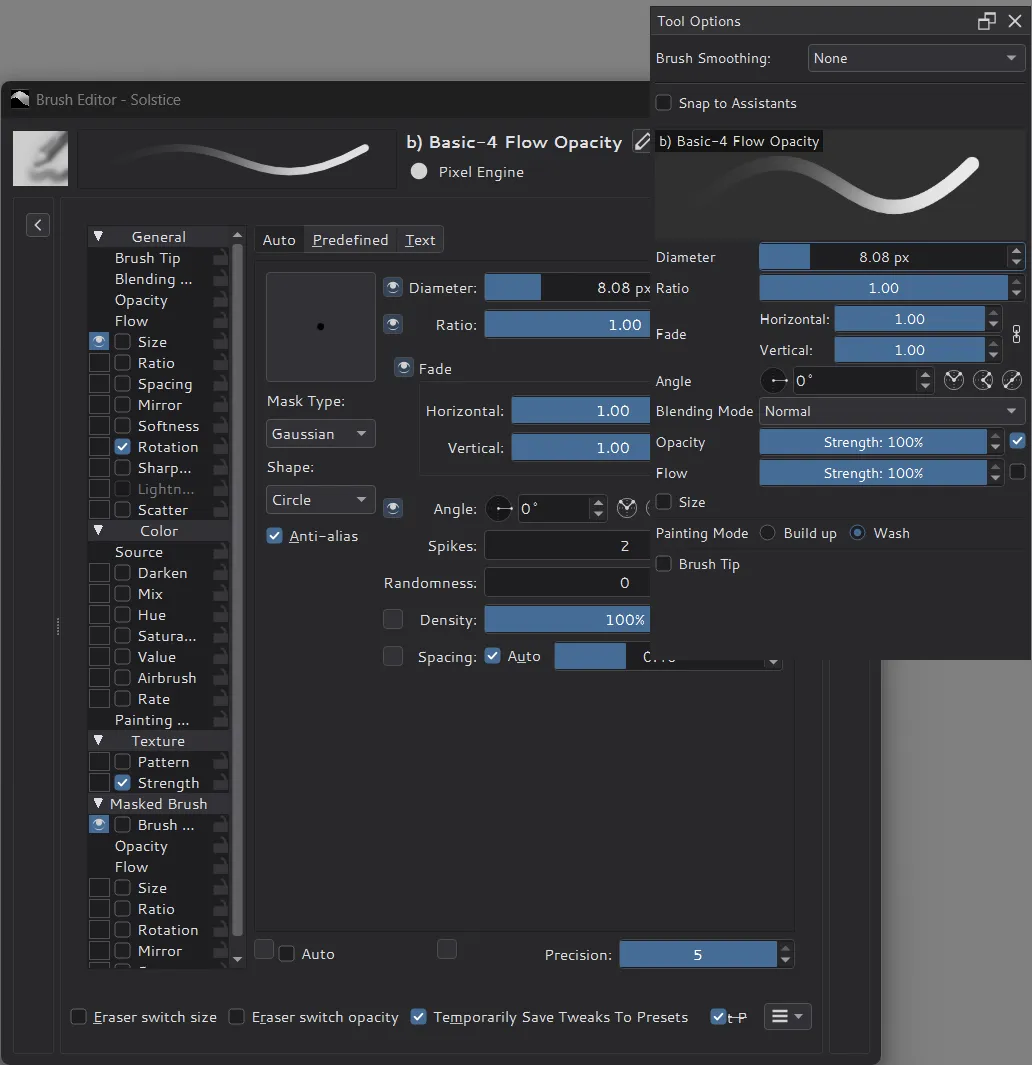
Mark a Brush Editor setting with an eye and Solstice shows it in the Tool Options docker, under the current brush's stroke preview, like Clip Studio Paint's eye marks.
What changes from Krita
- Eyes in the Brush Editor: an eye next to an option or setting (size, spacing, angle, opacity, flow, blending mode, texture scale and more) puts it in Tool Options.
- A brush section in Tool Options: the Freehand Brush, Line, shape and other brush tools show the marked settings below their own options, with the same controls. A change in either place applies to both.
- The current brush at a glance: the section starts with the brush's stroke preview and name. A modified brush shows
*after its name, and its preview follows the changes. - One choice per engine: the marked settings are remembered for each brush engine, so every Pixel Brush preset shows the same settings.
A shared model behind the Brush Editor
Every brush engine keeps its options in one shared model in Solstice, which both the Brush Editor and Tool Options use. A change updates only that option in the preset, and presets are saved in the same format as in Krita.